What Is Edge Computing? Types, Applications, and the Future
Fri, 06 December 2024

Follow the stories of academics and their research expeditions
“Project Implementation Plan,” professionals use to make sure they are on the right track. Do you even have an idea about how much professionals are in demand to rightfully carry out a project? According to Columbia SPS, by the year 2030, about 2.3 million of them will be wanted. Not only that, in the category of skilled professionals, there could be a shortage of 25-20 million of them.You name it and every industry: healthcare, IT, finance, construction. They all are in need of someone who has a clear understanding of how to go ahead while working on a project implementation plan.
A project has a topic to cater to its audience. But how well can it be executed? for that at the end everyone should be able to fully grab whatever they wanted to. There is a definite need for a proper project implementation Planning.All these mentioned sectors will look to add more employees. By 2027 there is a possibility of about 33% spike in the number of employees getting hired for the role. This career has a bright future. Meanwhile, if this career path will be on demand then one should also know the salaries attached to the role. One can earn around $90,000 to $120,000 in a year approximately.
Project Implementation Planning vs Project Plan vs Strategic Plan
Frequently Asked Questions (FAQs) About Project Implementation Plan
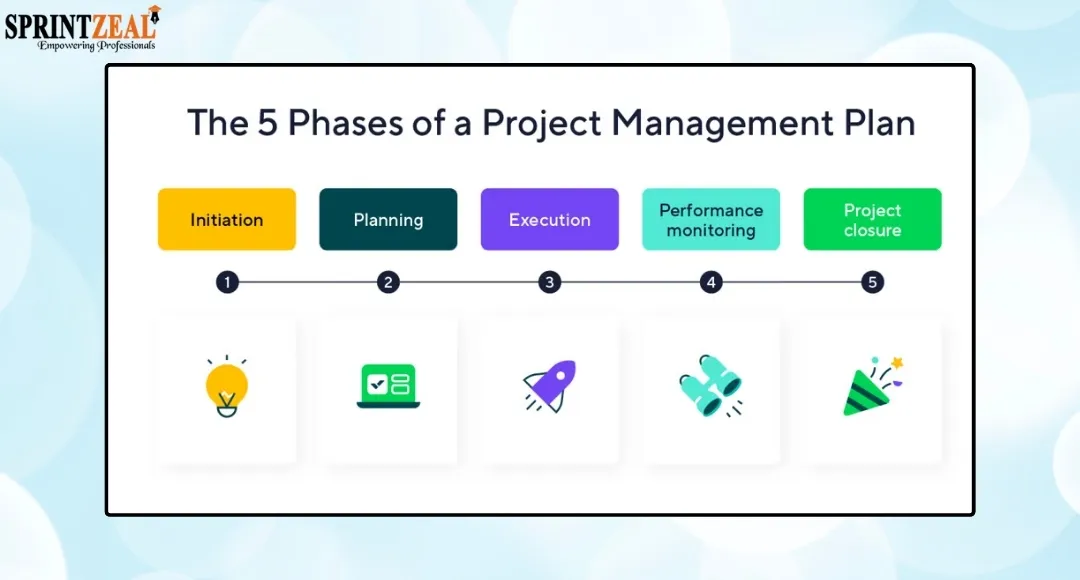
The planning and execution of a project involve various steps. A Project Implementation Plan is a fundamental document that shows all the steps- from what the goal is to how to complete the project. Once the idea of a project is agreed upon, the goals of the project are automatically known. After this, the only thing required is to take the necessary actions to achieve these goals. Then, this is where the implementation plan comes into play.
It not only has all the steps to be followed, but the steps are also arranged in sequence. In addition, the responsibilities designated to all the team members, the deadline, and the resources required to finish the project, all structured in a hierarchy format.
A Project Implementation Plan brings team members together, putting effort to achieve the same purpose. Moreover, an implementation plan is time-saving, helps to handle the spending thoughtfully, prepares for any kind of risk prevention in advance, and guarantees that stakeholders will adhere to their responsibilities based on their roles. A well-documented plan is always helpful, taking as a quick glance at it helps in monitoring progress and identifying the gaps while the project is being carried out.
While we plan a project, we have already imagined a desired outcome. But, if we decide to go forward with our project without proper planning we might miss out on various things like who should be assigned which task, how many resources will be required, budget, deadline, and so on. All these will contribute to either the project being put on a hold halfway or even lead to complete abandonment of the project. This is the reason why a Project Implementation Plan is crucial. Moving forward step-by-step will keep things organized and smoothly sail the project to the finish line.
Here are the few key reasons we should rely on an Implementation Plan:
Direction is Clear
There is a well-structured roadmap that shows the essential features such as- what to do first and then move to the next step. It also specifies what to do in each step. Lastly, it also provides details about the deadline, assigning a specific time for each task to get finished.
What to do first and what comes next
What to do in each steps
Each task has a specific time limit
Roles and Responsibilities are known
A team consists of members with expertise in different skills. Therefore, different tasks are assigned to different individuals. Once everyone knows their roles, the responsibilities are specified. Example: A designer will be asked to submit the designs by a specific date, In terms of budget, a finance person will be asked to track all the expenditures and review them weekly, meanwhile a project manager’s job is to keep an eye on everyone, whether they are acting in accordance with the plans or not.
Project Manager: Is in charge of observing and directing the project from start to finish; also keeping an eye on the team’s adherence to the plans.
Developer: write codes and run them
Content Writer: Create content on the project and send it for review before the final submission.
Time Management
Once everyone knows their roles and is aware of their responsibilities, the project work flows serially, allowing them a smooth transition from one step to another. In the project implementation plan, every step comes with a deadline. So, there is no fear of last-minute delays followed by confusion and chaos. Early planning guarantees that errors regarding the project are identified early and can be solved promptly resulting in saving the time.
Smooth Transition: One step at a time, no chance for overlapping.
Every step has a time-limit: Makes sure there is no rush in last minutes.
Error Detection in advance: Spotting threats early saves time.
Budget and Resource Control
When the steps required to complete the project are assigned, the budget required to carry out each step is also listed. So, it eventually helps to avoid overspending.Knowing the errors in advance further reduces the chances of extra money being wasted. A project Implementation plan also specifies the number of resources needed for each step, preventing, bulking up unnecessary resources. Tracking costs on a weekly basis ensures that the funds are being used wisely.
Budget Allocation: For each step there is a budget
Resource Planning: Specifies the resources required preventing unwanted resources
Cost Tracking: Weekly tracking leads to money being used effectively
Manages Risks
Risks are involved in almost every project. A problem popping up out of the blue might turn things upside down. So, a project implementation structure makes sure that there is a plan B. A definite solution cannot be expected, but it directs the actions that should be taken to prevent the project from stopping midway. Since different individuals are assigned their individual work , there is no room for miscommunication.
Plan B: An implementation plan guarantees a backup plan
No Miscommunication: All know their Responsibilities, so, no confusion
Guides Actions: There is no definite solution, but actions to fill the gap
Monitoring and Evaluation
Progress being tracked on a day-to-day basis leads to easy supervision for a project manager. The project manager can be aware of the tasks that are finished, and those which are still on standby, and the tasks taking the most amount of time to complete. So, reviewing progress on a regular basis helps to spot any issue in advance. Hence, they can be mitigated even before they cause a serious crisis.
Defined Time-limit: When to complete which task
Regular monitoring: Progress is monitored on a regular basis
Early Detection: Spotting of threats before they even cause a serious crisis.
Improves Team Coordination
Different ranges of responsibilities are assigned to individuals on a team. However, together they have the same goal: to successfully achieve the project outcomes. Therefore, every team member being aware of their fellow teammate’s duties leads to harmony in the team. A better coordination means assisting each other at the time of someone getting stuck midway.
One goal: Different duties but same goal of successfully completing the project
Know each other’s duties: Knowing fellow teammates’ duties leads to harmony
Better coordination: Get stuck, can ask for assistance from one another.
Strategic Plan
A strategic plan refers to the planning about the future based on a clear vision. When we think about something we want to achieve, we know why we want to do it and what our targets are in some years, followed by what values we will gain from our goals. A strategic plan often focuses on goals that are to be accomplished over some years and not on a day-to-day basis. In short, it is a big picture.
Example: Suppose a software company’s goal is to become the number one in terms of providing cybersecurity service in the next 5 years.
Here the strategic plan would include:
Why they want to do it (to build trust in the marketplace and eventually grow the business)
What is their target (maybe to work for 500+ customers and expand their operations in three different cities)
What value will it bring (brand trust and reputation leading to spike in the revenue, enhanced protection for the clients)
A timeline of years and not days (5years rather than daily tasks)
Project Planning
Project planning simply means organizing things that need to be done for a project from start to finish. First, the aim of the project; next, how someone will proceed with the steps to complete the project; what is the time limit for the project completion; what will be the expenditure on the project; who all are required to complete the project; and the risks that could possibly hold up the project - all these are part of project planning. Project planning is a detailed way to structure the needs of a project , but it does not contain information about the daily tasks that need to be done. In short, consider it as a recipe for the project.
Example: If a software company is launching their new cybersecurity software in less than eight months
What is the aim of the project (launching a cybersecurity software)
How they will proceed and what is to be added (including features that are not present and observe those already present)
Deadline (8 months)
Cost of the project (projected budget before the launch)
Teams that will work ( project manager, developers, testing individual, marketing team)
Risks (budget exceeding, technical issues)
Project Implementation Plan
Strategic planning is the first step then comes the project planning, and finally the implementation plan comes into picture. Strategic planning and project planning combined together leads to implementation planning with addition of a step-by-step guide to complete the project. Once the goals are clear, they need action. It also includes what all needs to be done on a daily basis, which tasks carried out by particular experts, and how much resources will be required.
Example: If a software company wants to launch their new cybersecurity in eight months
What are the tasks that needs action (First is designing, next step is developing followed by testing and then finally marketing the software)
Assigned members for each tasks (Testers, designers, developers, and marketing team)
Time limit (one step in a week or a specified time)
Resources required (cost, computers, software tools)
Possible risks in between (glitch in between, resources scarcity, slowing down)
To start an implementation plan, few things should be on paper. To begin with, there should be an approved signal from stakeholders and decision makers to start the project.
Necessary resources and approximate time required to finish a task or a step should be known to the team member before moving forward with the implementation plan.
Goals & Objectives
Goals refers to what will be the end result of the project, a desired outcome.
Objectives means a specific targets that are clear, measurable, and realistic
Objectives act as a guide for every task in the project
Scope
It is basically the boundaries (what is included and what should be avoided)
No confusion for the team as the right tasks are on paper.
Deliverables
Deliverables are nothing but the measurable results of the project.
These are the results that a team member wants to obtain when the project is finished.
It helps in monitoring the advancement of the project.
Work Breakdown Structure (WBS)
WBS’s job is to break down the project into small parts
Once the tasks are split into small sections, it is easy to assign roles, monitor the improvements, and handle how different tasks rely on one another.
Clear idea of a task which requires actions and also completed on a fixed time.
Milestones and Timeline
Milestones talks about the progress of the project.
Timeline simply means the tim when each task needs to be completed
It helps to track progress and also makes sure the project is moving forward as scheduled.
Roles and Responsibilities (RACI Matrix)
Specifies who will do what
Once everyone knows their role the next step for them is to know what they need to do
No room for confusion
Resource Plan (People, Budget, Tools)
It structures all the details about the resources (human, physical, and cost)
Human resources means team members, physical resources include computers, tools, and servers, whereas cost means the amount of money required
Everything in place prevents scarcity moving forward. Therefore, no delays.
Risk Management Plan
Any possible risks while moving forward with the project are identified
There are always the plans to curb the risks or eliminate it completely
No delays even if a threat arises
Communication Plan
How will the team members communicate during their work
Daily meetings, report and tools are included to share updates
As a result, all the team members are in coordination and if any problem arises they are known as fast as possible.
Success Metrics and KPIs
How to measure the success
Measuring in terms of time of completion, performing within the budget, quality of deliverables, satisfaction of customers
Big help in knowing whether the project goals are achieved or not
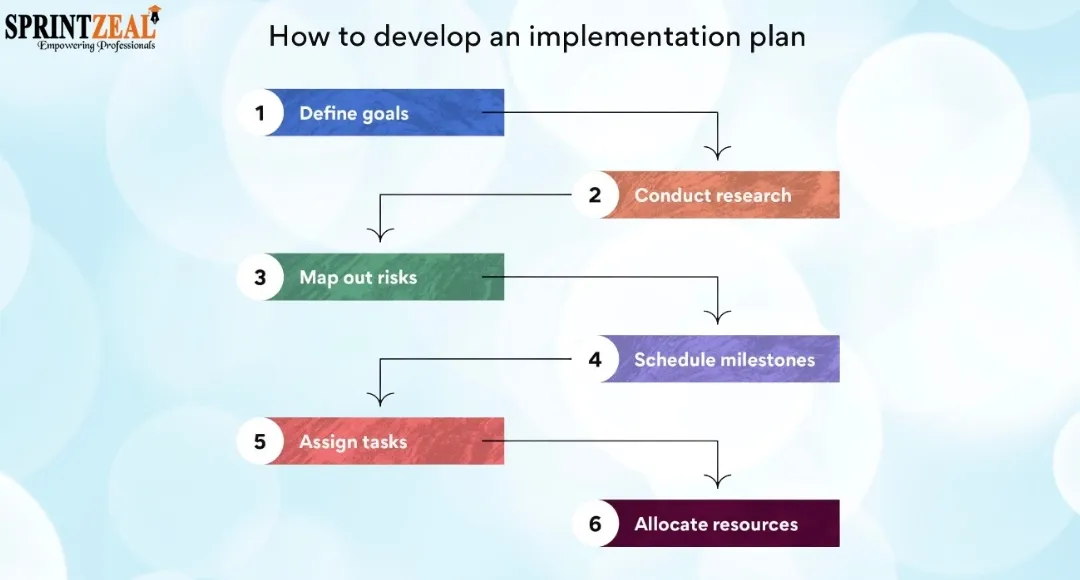
Step 1: Define Objectives and Success Criteria
What does the project aim to do at the end ?
Will the project be successful at the end? How to know
Step 2: Identify Stakeholders
List everyone, the ones working on the project and the ones who will get impacted by it.
The ones involved include team members, partners, and decision-makers. While clients are affected by the project.
Knowing the stakeholders who will approve the project makes communication easier.
Step 3: Define Scope and Deliverables
Identification of what all are included and what all are still required
Define, what will be the end result of the project delivered by the team
Step 4: Break Down Tasks and Dependencies
Split the tasks into smaller sections so that they can be managed easily
What to complete first based on the which one depends on another
Tracking progress becomes easier.
Step 5: Assign Roles and Responsibilities
Decide Who is going to do what
Clearly state the responsibilities for the roles
No room for overlapping
Step 6: Allocate Resources and Budget
Make a list of all the resources required (number of people, tools, and budget)
Planning in advance means no worries for scarcity in the future.
Step 7: Create Timeline and Milestones
Milestones are necessary as they show progress.
With each task also list the timings they need to be completed
It keeps the team in check and help them complete the tasks on time
Step 8: Identify Risks and Mitigation Strategies
Identify what could be the possible threats during the project work.
Plan in advance how to fix issues when the problems arise
Once the plan is ready, there are less chances of delaying the project.
Step 9: Finalize and Approve the Plan
The stakeholders and decision-makers should be aware of your plans and provide their point of view (feedback).
Change required, adjust accordingly
A formal approval should be the first step before implementing the plans.
Based on your project title, ideas by the project manager, tasks assigned, deadline, resources, you can make use of this project implementation plan template.
Project overview:
Field | Details |
Project Title |
|
Project Manager Name |
|
Start Date |
|
End Date (expected) |
|
Project Objective |
|
Stakeholders:
Stakeholder | Role/Involvement | Contact |
Include (CEO, CTO, Project Manager, Development lead, QA Lead, Marketing Manager, SME Clients) | What are their roles (Project Sponsor, Technical Oversight, Overall Execution & Monitoring, Technical Delivery, Testing & Quality Assurance, Product Launch & Promotion, End Users) | Provide email addresses |
Goals & Success Criteria :
Goals | Success Criteria |
|
|
|
|
|
|
|
|
Scope / Deliverables :
In scope | Out of scope | Deliverables |
|
|
|
Tasks, Timeline, Dependencies & Responsibilities :
Task ID | Task Description | Start Date | End Date | Dependencies | Responsible | Status |
|
|
|
|
|
|
|
|
|
|
|
|
|
|
|
|
|
|
|
|
|
|
|
|
|
|
|
|
Resource Plan :
Resource category | Details | Quantity/Allocation | Estimated budget |
Human resources, tools, budget, servers |
| Number of members, Licenses as needed, serves needed) |
|
Milestones :
Milestones | Target Date | Notes |
Required sign off, Marketing launch kit ready, Product Launch |
| Approved by PM & CTO, For promotional campaigns, Go Live |
Risk Management :
Risk | Likelihood | Impact | Mitigation Plan |
Developer unavailable, Critical bug found during QA, budget overrun, Client feedback delays | Low, medium, high | High, medium | Cross-train backup developer, Schedule early user testing, Monitor weekly and adjust non-critical spending |
Communication Plan:
Communication Type | Frequency | Participants | Tool/method |
Daily Stand-up, weekly status report, milestone review, Risk and issue escalation | Daily, weekly, as needed | Project team, stake holders, CTO | Zoom, MS Teams, Email, Shared Docs, meeting, video call |
Success Metrics / KPIs:
Metric | Target | Current Status |
Completion on time, bug count, stakeholder satisfaction | Date, numbers, greater than less than values | Planned |
Example: An IT Company will launch a cybersecurity software within a span of 8 months
Project overview:
Field | Details |
Project Title | Launch of cybersecurity software |
Project Manager Name | XYZ |
Start Date | July 17 2026 |
End Date (expected) | Feb 28 2027 |
Project Objective | To launch a cybersecurity software for small and medium enterprises to protect them from malicious activities like fishing |
Stakeholders:
Stakeholder | Role/Involvement | Contact |
CEO | Project Sponsor | @emailaddress |
CTO | Technical Oversight | @emailaddress |
Project Manager | Overall Execution | @emailaddress |
Development lead | Monitoring TechnicalDelivery | @emailaddress |
QA Lead | Testing & Quality Assurance | @emailaddress |
Marketing Manager | Product Launch & Promotion | @emailaddress |
SME Clients | End Users | @emailaddress |
Goals & Success Criteria:
Goals | Success Criteria |
Develop a secure cybersecurity software | Software released with no critical vulnerabilities |
Deliver project within timelimit | Product launching within 8 months |
Ensure high product quality | Less than 3% bug rate after testing |
Achieve customer adoption | 500+ users in first 3 months |
Scope / Deliverables:
In scope | Out of scope | Deliverables |
Software development | Software development | Cybersecurity software |
UI/UX design | Hardware installation | Product documentation |
Testing and quality assurance | Customer hardware setup | User training guide |
Marketing campaign | International expansion | Launch campaign |
Tasks, Timeline, Dependencies & Responsibilities:
Task ID | Task Description | Start Date | End Date | Dependencies | Responsible | Status |
T1 | Requirement Analysis | July 17 2026 | July 30 2026 | None | Project Manager | Completed |
T2 | UI/UX Design | Aug 10 2026 | Aug 30 2026 | T1 | Design Team | Completed |
T3 | Software Development | Sep 1 2026 | Oct 31 2026 | T2 | Development Team | In Progress |
T4 | Testing & Bug Fixing | Nov 1 2026 | Nov 31 2026 | T3 | QA Team | Pending |
T5 | Marketing Campaign | Dec 2026 | Jan 31 2026 | T3 | Marketing Team | Pending |
T6 | Product Launch | Feb 28 2027 | Feb 28 2027 | T4, T5 | Project Manager | Pending |
Resource Plan:
Resource category | Details | Quantity/Allocation | Estimated budget |
Human Resources | Developers | 6 | $60,000 |
Human Resources | QA Engineers | 3 | $20,000 |
Tools | Development Software Licenses | 5 | $5,000 |
Infrastructure | Cloud Servers | 2 | $8,000 |
Marketing | Digital Marketing Campaign | 1 Campaign | $10,000 |
Milestones:
Milestones | Target Date | Notes |
Project Kickoff | July 30 2026 | Approved by CEO |
Design Completion | Aug 30 2026 | UI Finalized |
Development Completion | Oct 31 2026 | Software ready for testing |
Testing Completion | Nov 31 2026 | QA sign-off |
Product Launch | Feb 28 2027 | Public release |
Risk Management:
Risk | Likelihood | Impact | Mitigation Plan |
Developer unavailable | Medium | High | Cross-train backup developer |
Critical bugs during QA | High | High | Early testing cycles |
Budget overrun | Low | Medium | Weekly cost monitoring |
Client feedback delays | Medium | Medium | Schedule review checkpoints |
Communication Plan:
Communication Type | Frequency | Participants | Tool/method |
Daily Stand-up | Daily | Development Team | MS Teams |
Weekly Status Report | Weekly | Project Team & Stakeholders | |
Milestone Review | Monthly | Leadership Team | Zoom Meeting |
Risk Escalation | As needed | Project Manager & CTO | Direct Meeting |
Success Metrics / KPIs:
Metric | Target | Current Status |
Project Completion Time | Within 8 months | On Track |
Bug Count | < 3> | In Progress |
Stakeholder Satisfaction | > 90% | Pending |
Customer Adoption | 500+ users | Pending |
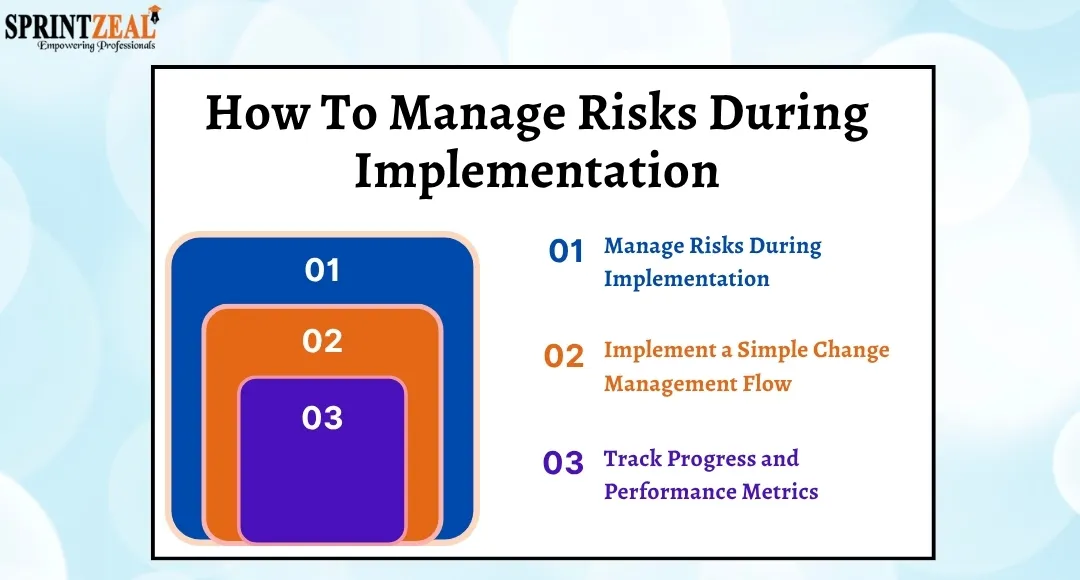
When a project is executed successfully, it is due to proper planning, team members actively involved in the project, and execution of a project by considering each step. Therefore, here are some fundamental techniques identified by project man management experts and frameworks:
Before the execution of a project, the planning is very important. So, thinking before acting is the key. One should be clear about what they want to achieve.
Rules for this:
Goals should be clear. One should know what the end result will exactly look like.
Planning beforehand: Breaking the complicated project into small sections.
Focus on important things first: Focus on tasks that hold the most value.
Keep an eye on the people involved: All the members should be trained and informed about the project details
Track forward movement: Every time we keep track of things we are doing, it is easier to spot any threats early.
Governance and Change Control
If a plan for a project comes with switch rules attached to it, there will be no worry for unclear decisions, delays, and overlapping of tasks. In case no rules exist, a project will get difficult to deal with as a lot of confusion may arise.
Rules for this:
Appoint decision-makers for big decisions.
Clearly state the roles and responsibility attached to it
Don’t make any changes in goals and tasks without acceptance
You should know who you should consult if any problem arises
Documentation Standards
A documentation is nothing but kind of a project diary. The document shows the planning which was done, what happened according to the planning, and who is responsible for what. If there is no documentation, chances are that on ebay forget tasks, and may also miss out on important details.
Rules for this:
Maintain a consistent format for documentation.
Always save the new version of document if any changes happen
Always register any issue that would hinder the project (like the resignation of an employee midway)
Make a note of things discussed during the meetings and also include each member's responsibilities along with their deadline
Make sure all the documents are stored in one place (like drive) and are accessible to all.
Whenever the project execution goes wrong, it is usually not because of any technical issues but improper planning of the steps, communication gaps, or management issues. Here are some of the most common mistakes:
Scope Creep
Scope Creep refers to doing extra work than required. Addition of extra features, steps, and requirements leads to an increase in cost, timeline, and resources. A project implementation plan does the work to clearly define the goals step-by-step. So, whenever something new is being added, everyone would know how much to work and how much extra to add.
Undefined Ownership
Undefined ownership refers to not having a clear idea about who will do what. So, when no one is assigned, weeks will pass and the main task will still be on the paper. When an implementation plan is made, it clearly states the roles of team members along with their responsibilities to be done on a specific timeline.
Unrealistic Deadline
If we just imagine a timeline to complete a task without considering the severity of the steps, a project will not only face delay but will also be a burnout for the team members. The quality of the work will lack standards. Therefore, completing a task within a shorter time range will affect the quality and taking longer hours for a task will lead to missing the deadlines. Hence, the team coordination will be broken.
Poor Risk Planning
When we don’t think about any possible risks that would arise amidst the project work, we would fail to mitigate or eliminate them in between. So, in return it will lead to delays.
To keep the project on track there are various tools required for assistance in planning, tracking the progress, and something that makes the communication between teams smoother. Most commonly used tools are:
Gantt Charts
Gantt charts are mostly used to manage project planning and managing. They are a visual representation of all the tasks that need to be done for a project. Along with the taste the timeline is also mentioned. When to start a task to when it will end and how are the tasks related to each other, it contains all of these. So, by having a glance at the Gantt charts, the team members can know the order in which the tasks need to be done.
Gantt charts also help in showing dependencies. Which task should be completed first so that the next task related to it won’t get affected. It also helps to monitor the progress. As a task is finished one can update the changes on Gantt charts. In this case the idea will be clear what is done and dusted and what needs more time. Lastly, it also helps to make the communication between the team members smooth. As it contains stole along with responsibilities, and time limit, there won’t be any misunderstanding between the team members regarding who will do what and at what time.
Example: Spreadsheet, TeamGantt, Microsoft Project, Wrike, Google sheets.
Project Management Software
Unlike spreadsheets, emails or on paper details, the project management software helps to save data in one place. Every member associated with the project can know what are thor roles and what they need to do and when they need to complete. It is helpful when more than one task is performed at the same time.
By making use of this tool, the team members can mark their tasks as completed once it's done, update the status , and leave notes. Managers can easily see what is lagging behind and fix accordingly. Therefore, the workloads can be managed and at the same time it also improves teamwork.
Example: ProjectManager.com, Teamwork, Asana, Trello, Monday.com
Collaboration Tools
Collaborative tools come into picture especially when people work remotely. These tools help to maintain the communication between the members with mostly no glitch in the quality. So, depending on emails- too long to contemplate, holding meetings for long hours, are replaced by sharing files, updates, and ideas in real time. By using this tool everyone will remain on the same page and there will be no confusion.
Sharing information or documents both are easy to share in a central place. Everyone can have access to the latest versions of files. So, no one will be working on an outdated version of a file leading to losing important information. It also improves communication. The team can chat with each other, comment on the tasks, and initiate a virtual meeting. Lastly, there is transparency in the communication. Every member will know what others are doing, what’s completed,and what is still left. Therefore, there is no room for misunderstanding and delay.
Example: MS Teams, Slack, Google Drive
Project Implementation Plan is the backbone of any project where the main goal is to deliver successfully. Clear goals, roles and responsibilities, time limits, resources, budget, and risks, all existing in one place, make it easy to take actions for the steps present. Want to know more? popular sites like Udemy also provide courses for this role.
A project split into small sections is manageable for execution and reduces stress. Tracking the progress and implementing plans makes sure the team is producing an effective outcome while aligning with the project objectives.
Tools like Gantt charts, project management software, and collaboration platforms make it even easier to track the progress and make communication easier so that the team members are on the same page. Furthermore, risks can be avoided with the help of Project Implementation plan.
Lastly, a project Implementation plan does not only guide team members, but also its visual representation shows all things in one place. Also, you might be interested in the courses provided by our organisation, Sprintzeal.
Particularly talking about courses related to project management, you can check out the following:
PMP Certification Training Course
PRINCE2® 7th Edition
A Project Implementation Plan is a fundamental document that shows all the steps – from what the goal is to how to complete the project. In addition, it also shows the roles and responsibilities, deadlines and resources needed.
Risk Planning refers to identifying any bugs or threats in advance and, accordingly, deciding what to do to mitigate their effect. In this case, a risk register is often considered to show all the potential risks, their impact, and plans to curb the issues.
Commonly used tools are:
Gantt charts (e.g., Spreadsheet, TeamGantt, Microsoft Project, Wrike, Google sheets )
Project management software (e.g., Teamwork, Asana, Microsoft Project)
Collaboration tools (eg: Slack, MS Teams, Google Drive)
Yes, we can definitely incorporate the changes. However, the changes made should be approved and reviewed so that the team members should be aware of the changes so that the project adheres to the plans.
The 7 stages of Project Implementation Includes, intake, initiation, planning, product, selection, execution, monitoring & control, and closure.
Strategic, tactical, operational, contingency, financial, sales & marketing, and workforce are included as the 7 types of project implementation planning.
A project Manager is usually responsible for supervising a project Implementation Plan. However, the resources required, deadline, and carry forward of the project are all altogether decided by team leads, stakeholders, and subject matter experts.
There are various steps involved in a project implementation plan. The steps will have goals, who will do what role, and what the possible risks can be in the future. So, a project implementation plan will have its own size, how complex will the project be? and what is the scope of the project? All the above three mentioned aspects will actually decide the time period to create a project implementation plan. Therefore, there is no such thing as a fixed time period.
There are various stakeholders attached to a project implementation plan. Each stakeholder has a role to play. Approving project objectives, what resources are needed and how much is needed, when and where will the resources be needed, and what is the progress so far. Stakeholders make sure they have approved all these.
The planning and execution of a project involve various steps. A Project Implementation Plan is a fundamental document that shows all the steps- from what the goal is to how to complete the project. Once the idea of a project is agreed upon, the goals of the project are automatically known. After this, the only thing required is to take the necessary actions to achieve these goals. Then, this is where the implementation plan comes into play.
It not only has all the steps to be followed, but the steps are also arranged in sequence. In addition, the responsibilities designated to all the team members, the deadline, and the resources required to finish the project, all structured in a hierarchy format.
A Project Implementation Plan brings team members together, putting effort to achieve the same purpose. Moreover, an implementation plan is time-saving, helps to handle the spending thoughtfully, prepares for any kind of risk prevention in advance, and guarantees that stakeholders will adhere to their responsibilities based on their roles. A well-documented plan is always helpful, taking as a quick glance at it helps in monitoring progress and identifying the gaps while the project is being carried out.
While we plan a project, we have already imagined a desired outcome. But, if we decide to go forward with our project without proper planning we might miss out on various things like who should be assigned which task, how many resources will be required, budget, deadline, and so on. All these will contribute to either the project being put on a hold halfway or even lead to complete abandonment of the project. This is the reason why a Project Implementation Plan is crucial. Moving forward step-by-step will keep things organized and smoothly sail the project to the finish line.
Here are the few key reasons we should rely on an Implementation Plan:
Direction is Clear
There is a well-structured roadmap that shows the essential features such as- what to do first and then move to the next step. It also specifies what to do in each step. Lastly, it also provides details about the deadline, assigning a specific time for each task to get finished.
Roles and Responsibilities are known
A team consists of members with expertise in different skills. Therefore, different tasks are assigned to different individuals. Once everyone knows their roles, the responsibilities are specified. Example: A designer will be asked to submit the designs by a specific date, In terms of budget, a finance person will be asked to track all the expenditures and review them weekly, meanwhile a project manager’s job is to keep an eye on everyone, whether they are acting in accordance with the plans or not.
Once everyone knows their roles and is aware of their responsibilities, the project work flows serially, allowing them a smooth transition from one step to another. In the project implementation plan, every step comes with a deadline. So, there is no fear of last-minute delays followed by confusion and chaos. Early planning guarantees that errors regarding the project are identified early and can be solved promptly resulting in saving the time.
When the steps required to complete the project are assigned, the budget required to carry out each step is also listed. So, it eventually helps to avoid overspending.Knowing the errors in advance further reduces the chances of extra money being wasted. A project Implementation plan also specifies the number of resources needed for each step, preventing, bulking up unnecessary resources. Tracking costs on a weekly basis ensures that the funds are being used wisely.
Risks are involved in almost every project. A problem popping up out of the blue might turn things upside down. So, a project implementation structure makes sure that there is a plan B. A definite solution cannot be expected, but it directs the actions that should be taken to prevent the project from stopping midway. Since different individuals are assigned their individual work , there is no room for miscommunication.
Progress being tracked on a day-to-day basis leads to easy supervision for a project manager. The project manager can be aware of the tasks that are finished, and those which are still on standby, and the tasks taking the most amount of time to complete. So, reviewing progress on a regular basis helps to spot any issue in advance. Hence, they can be mitigated even before they cause a serious crisis.
Different ranges of responsibilities are assigned to individuals on a team. However, together they have the same goal: to successfully achieve the project outcomes. Therefore, every team member being aware of their fellow teammate’s duties leads to harmony in the team. A better coordination means assisting each other at the time of someone getting stuck midway.
Better coordination: Get stuck, can ask for assistance from one another.
To start an implementation plan, few things should be on paper. To begin with, there should be an approved signal from stakeholders and decision makers to start the project.
Necessary resources and approximate time required to finish a task or a step should be known to the team member before moving forward with the implementation plan.
Goals & Objectives
Scope
Deliverables
Work Breakdown Structure (WBS)
Milestones and Timeline
Roles and Responsibilities (RACI Matrix)
Resource Plan (People, Budget, Tools)
Risk Management Plan
Communication Plan
Success Metrics and KPIs
Step 1: Define Objectives and Success Criteria
Step 2: Identify Stakeholders
Step 3: Define Scope and Deliverables
Step 4: Break Down Tasks and Dependencies
Step 5: Assign Roles and Responsibilities
Step 6: Allocate Resources and Budget
Step 7: Create Timeline and Milestones
Step 8: Identify Risks and Mitigation Strategies
Step 9: Finalize and Approve the Plan
Based on your project title, ideas by the project manager, tasks assigned, deadline, resources, you can make use of this project implementation plan template.
Project overview:
|
Field |
Details |
|
Project Title |
|
|
Project Manager Name |
|
|
Start Date |
|
|
End Date (expected) |
|
|
Project Objective |
|
Stakeholders:
|
Stakeholder |
Role/Involvement |
Contact |
|
Include (CEO, CTO, Project Manager, Development lead, QA Lead, Marketing Manager, SME Clients) |
What are their roles (Project Sponsor, Technical Oversight, Overall Execution & Monitoring, Technical Delivery, Testing & Quality Assurance, Product Launch & Promotion, End Users) |
Provide email addresses |
Goals & Success Criteria :
|
Goals |
Success Criteria |
|
|
|
|
|
|
|
|
|
|
|
|
Scope / Deliverables :
|
In scope |
Out of scope |
Deliverables |
|
|
|
|
Tasks, Timeline, Dependencies & Responsibilities :
|
Task ID |
Task Description |
Start Date |
End Date |
Dependencies |
Responsible |
Status |
|
|
|
|
|
|
|
|
|
|
|
|
|
|
|
|
|
|
|
|
|
|
|
|
|
|
|
|
|
|
|
|
Resource Plan :
|
Resource category |
Details |
Quantity/Allocation |
Estimated budget |
|
Human resources, tools, budget, servers |
|
Number of members, Licenses as needed, serves needed) |
|
Milestones :
|
Milestones |
Target Date |
Notes |
|
Required sign off, Marketing launch kit ready, Product Launch |
|
Approved by PM & CTO, For promotional campaigns, Go Live |
Risk Management :
|
Risk |
Likelihood |
Impact |
Mitigation Plan |
|
Developer unavailable, Critical bug found during QA, budget overrun, Client feedback delays |
Low, medium, high |
High, medium |
Cross-train backup developer, Schedule early user testing, Monitor weekly and adjust non-critical spending |
Communication Plan:
|
Communication Type |
Frequency |
Participants |
Tool/method |
|
Daily Stand-up, weekly status report, milestone review, Risk and issue escalation |
Daily, weekly, as needed |
Project team, stake holders, CTO |
Zoom, MS Teams, Email, Shared Docs, meeting, video call |
Success Metrics / KPIs:
|
Metric |
Target |
Current Status |
|
Completion on time, bug count, stakeholder satisfaction |
Date, numbers, greater than less than values |
Planned |
Example: An IT Company will launch a cybersecurity software within a span of 8 months
Project overview:
|
Field |
Details |
|
Project Title |
Launch of cybersecurity software |
|
Project Manager Name |
XYZ |
|
Start Date |
July 17 2026 |
|
End Date (expected) |
Feb 28 2027 |
|
Project Objective |
To launch a cybersecurity software for small and medium enterprises to protect them from malicious activities like fishing |
Stakeholders:
|
Stakeholder |
Role/Involvement |
Contact |
|
CEO |
Project Sponsor |
@emailaddress |
|
CTO |
Technical Oversight |
@emailaddress |
|
Project Manager |
Overall Execution |
@emailaddress |
|
Development lead |
Monitoring TechnicalDelivery |
@emailaddress |
|
QA Lead |
Testing & Quality Assurance |
@emailaddress |
|
Marketing Manager |
Product Launch & Promotion |
@emailaddress |
|
SME Clients |
End Users |
@emailaddress |
Goals & Success Criteria:
|
Goals |
Success Criteria |
|
Develop a secure cybersecurity software |
Software released with no critical vulnerabilities |
|
Deliver project within timelimit |
Product launching within 8 months |
|
Ensure high product quality |
Less than 3% bug rate after testing |
|
Achieve customer adoption |
500+ users in first 3 months |
Scope / Deliverables:
|
In scope |
Out of scope |
Deliverables |
|
Software development |
Software development |
Cybersecurity software |
|
UI/UX design |
Hardware installation |
Product documentation |
|
Testing and quality assurance |
Customer hardware setup |
User training guide |
|
Marketing campaign |
International expansion |
Launch campaign |
Tasks, Timeline, Dependencies & Responsibilities:
|
Task ID |
Task Description |
Start Date |
End Date |
Dependencies |
Responsible |
Status |
|
T1 |
Requirement Analysis |
July 17 2026 |
July 30 2026 |
None |
Project Manager |
Completed |
|
T2 |
UI/UX Design |
Aug 10 2026 |
Aug 30 2026 |
T1 |
Design Team |
Completed |
|
T3 |
Software Development |
Sep 1 2026 |
Oct 31 2026 |
T2 |
Development Team |
In Progress |
|
T4 |
Testing & Bug Fixing |
Nov 1 2026 |
Nov 31 2026 |
T3 |
QA Team |
Pending |
|
T5 |
Marketing Campaign |
Dec 2026 |
Jan 31 2026 |
T3 |
Marketing Team |
Pending |
|
T6 |
Product Launch |
Feb 28 2027 |
Feb 28 2027 |
T4, T5 |
Project Manager |
Pending |
Resource Plan:
|
Resource category |
Details |
Quantity/Allocation |
Estimated budget |
|
Human Resources |
Developers |
6 |
$60,000 |
|
Human Resources |
QA Engineers |
3 |
$20,000 |
|
Tools |
Development Software Licenses |
5 |
$5,000 |
|
Infrastructure |
Cloud Servers |
2 |
$8,000 |
|
Marketing |
Digital Marketing Campaign |
1 Campaign |
$10,000 |
Milestones:
|
Milestones |
Target Date |
Notes |
|
Project Kickoff |
July 30 2026 |
Approved by CEO |
|
Design Completion |
Aug 30 2026 |
UI Finalized |
|
Development Completion |
Oct 31 2026 |
Software ready for testing |
|
Testing Completion |
Nov 31 2026 |
QA sign-off |
|
Product Launch |
Feb 28 2027 |
Public release |
Risk Management:
|
Risk |
Likelihood |
Impact |
Mitigation Plan |
|
Developer unavailable |
Medium |
High |
Cross-train backup developer |
|
Critical bugs during QA |
High |
High |
Early testing cycles |
|
Budget overrun |
Low |
Medium |
Weekly cost monitoring |
|
Client feedback delays |
Medium |
Medium |
Schedule review checkpoints |
Communication Plan:
|
Communication Type |
Frequency |
Participants |
Tool/method |
|
Daily Stand-up |
Daily |
Development Team |
MS Teams |
|
Weekly Status Report |
Weekly |
Project Team & Stakeholders |
|
|
Milestone Review |
Monthly |
Leadership Team |
Zoom Meeting |
|
Risk Escalation |
As needed |
Project Manager & CTO |
Direct Meeting |
Success Metrics / KPIs:
|
Metric |
Target |
Current Status |
|
Project Completion Time |
Within 8 months |
On Track |
|
Bug Count |
< 3> |
In Progress |
|
Stakeholder Satisfaction |
> 90% |
Pending |
|
Customer Adoption |
500+ users |
Pending |
When a project is executed successfully, it is due to proper planning, team members actively involved in the project, and execution of a project by considering each step. Therefore, here are some fundamental techniques identified by project man management experts and frameworks:
Before the execution of a project, the planning is very important. So, thinking before acting is the key. One should be clear about what they want to achieve.
Rules for this:
Governance and Change Control
If a plan for a project comes with switch rules attached to it, there will be no worry for unclear decisions, delays, and overlapping of tasks. In case no rules exist, a project will get difficult to deal with as a lot of confusion may arise.
Rules for this:
Documentation Standards
A documentation is nothing but kind of a project diary. The document shows the planning which was done, what happened according to the planning, and who is responsible for what. If there is no documentation, chances are that on ebay forget tasks, and may also miss out on important details.
Rules for this:
Whenever the project execution goes wrong, it is usually not because of any technical issues but improper planning of the steps, communication gaps, or management issues. Here are some of the most common mistakes:
Scope Creep
Scope Creep refers to doing extra work than required. Addition of extra features, steps, and requirements leads to an increase in cost, timeline, and resources. A project implementation plan does the work to clearly define the goals step-by-step. So, whenever something new is being added, everyone would know how much to work and how much extra to add.
Undefined Ownership
Undefined ownership refers to not having a clear idea about who will do what. So, when no one is assigned, weeks will pass and the main task will still be on the paper. When an implementation plan is made, it clearly states the roles of team members along with their responsibilities to be done on a specific timeline.
Unrealistic Deadline
If we just imagine a timeline to complete a task without considering the severity of the steps, a project will not only face delay but will also be a burnout for the team members. The quality of the work will lack standards. Therefore, completing a task within a shorter time range will affect the quality and taking longer hours for a task will lead to missing the deadlines. Hence, the team coordination will be broken.
Poor Risk Planning
When we don’t think about any possible risks that would arise amidst the project work, we would fail to mitigate or eliminate them in between. So, in return it will lead to delays.
To keep the project on track there are various tools required for assistance in planning, tracking the progress, and something that makes the communication between teams smoother. Most commonly used tools are:
Gantt charts are mostly used to manage project planning and managing. They are a visual representation of all the tasks that need to be done for a project. Along with the taste the timeline is also mentioned. When to start a task to when it will end and how are the tasks related to each other, it contains all of these. So, by having a glance at the Gantt charts, the team members can know the order in which the tasks need to be done.
Gantt charts also help in showing dependencies. Which task should be completed first so that the next task related to it won’t get affected. It also helps to monitor the progress. As a task is finished one can update the changes on Gantt charts. In this case the idea will be clear what is done and dusted and what needs more time. Lastly, it also helps to make the communication between the team members smooth. As it contains stole along with responsibilities, and time limit, there won’t be any misunderstanding between the team members regarding who will do what and at what time.
Example: Spreadsheet, TeamGantt, Microsoft Project, Wrike, Google sheets.
Unlike spreadsheets, emails or on paper details, the project management software helps to save data in one place. Every member associated with the project can know what are thor roles and what they need to do and when they need to complete. It is helpful when more than one task is performed at the same time.
By making use of this tool, the team members can mark their tasks as completed once it's done, update the status , and leave notes. Managers can easily see what is lagging behind and fix accordingly. Therefore, the workloads can be managed and at the same time it also improves teamwork.
Example: ProjectManager.com, Teamwork, Asana, Trello, Monday.com
Collaborative tools come into picture especially when people work remotely. These tools help to maintain the communication between the members with mostly no glitch in the quality. So, depending on emails- too long to contemplate, holding meetings for long hours, are replaced by sharing files, updates, and ideas in real time. By using this tool everyone will remain on the same page and there will be no confusion.
Sharing information or documents both are easy to share in a central place. Everyone can have access to the latest versions of files. So, no one will be working on an outdated version of a file leading to losing important information. It also improves communication. The team can chat with each other, comment on the tasks, and initiate a virtual meeting. Lastly, there is transparency in the communication. Every member will know what others are doing, what’s completed,and what is still left. Therefore, there is no room for misunderstanding and delay.
Example: MS Teams, Slack, Google Drive
Project Implementation Plan is the backbone of any project where the main goal is to deliver successfully. Clear goals, roles and responsibilities, time limits, resources, budget, and risks, all existing in one place, make it easy to take actions for the steps present. Want to know more? popular sites like Udemy also provide courses for this role.
A project split into small sections is manageable for execution and reduces stress. Tracking the progress and implementing plans makes sure the team is producing an effective outcome while aligning with the project objectives.
Tools like Gantt charts, project management software, and collaboration platforms make it even easier to track the progress and make communication easier so that the team members are on the same page. Furthermore, risks can be avoided with the help of Project Implementation plan.
Lastly, a project Implementation plan does not only guide team members, but also its visual representation shows all things in one place. Also, you might be interested in the courses provided by our organisation, Sprintzeal.
Particularly talking about courses related to project management, you can check out the following:
PMP Certification Training Course
PRINCE2® 7th Edition
A Project Implementation Plan is a fundamental document that shows all the steps – from what the goal is to how to complete the project. In addition, it also shows the roles and responsibilities, deadlines and resources needed.
Risk Planning refers to identifying any bugs or threats in advance and, accordingly, deciding what to do to mitigate their effect. In this case, a risk register is often considered to show all the potential risks, their impact, and plans to curb the issues.
Commonly used tools are:
Yes, we can definitely incorporate the changes. However, the changes made should be approved and reviewed so that the team members should be aware of the changes so that the project adheres to the plans.
The 7 stages of Project Implementation Includes, intake, initiation, planning, product, selection, execution, monitoring & control, and closure.
Strategic, tactical, operational, contingency, financial, sales & marketing, and workforce are included as the 7 types of project implementation planning.
A project Manager is usually responsible for supervising a project Implementation Plan. However, the resources required, deadline, and carry forward of the project are all altogether decided by team leads, stakeholders, and subject matter experts.
There are various steps involved in a project implementation plan. The steps will have goals, who will do what role, and what the possible risks can be in the future. So, a project implementation plan will have its own size, how complex will the project be? and what is the scope of the project? All the above three mentioned aspects will actually decide the time period to create a project implementation plan. Therefore, there is no such thing as a fixed time period.
There are various stakeholders attached to a project implementation plan. Each stakeholder has a role to play. Approving project objectives, what resources are needed and how much is needed, when and where will the resources be needed, and what is the progress so far. Stakeholders make sure they have approved all these.

Sprintzeal
Fri, 06 December 2024
Wed, 16 October 2024

Tue, 01 October 2024


© 2024 Sprintzeal Americas Inc. - All Rights Reserved.

 USA : +1315-322-7821
 UK : +44 7700 174870
 IND : +919008230179
 AUS : +61 480 005 455
Leave a comment